CLOCK WATCHDOG TIMEOUT
A horror story.

Do you ever get that feeling when you're in the zone, typing about a billion words per minute, flying along, and then ... Why is this key not working? Ergh, mouse not working either. After 5 seconds, bam! BSOD! Yeah, me too. Fortunately, I did some in depth-analysis and will show you the solution in this article.
The frustrating experience of random BSODs
The first time this BSOD happened after I bought my laptop (HP Pavilion series, i7 running Windows 11), I thought it was random. It just froze and 5 seconds later the BSOD appeared. I had to do a hard restart, since it was completely unresponsive. Having dealt with many low performance PCs before, I didn't think much of it, believed it was just a random error and it would go away on its own. About 3 or 4 days later while I was coding, it happened again. I googled it to see if it happened to other people as well and it had. Unfortunately, all the articles I'd read so far on it are either completely inconclusive, or just wrong. Many of those blame the processor, because that's just the obvious answer.
CLOCK_WATCHDOG_TIMEOUT Error in a Nutshell:
Essentially, a watchdog timer is an electronic timer to detect and recover from computational malfunctions. If due to a hardware or software fault the computer fails to restart the timer: cue in the BSOD (timeout signal). Remember, the textbook definition is not CPU specific. Zlatanov, 2014
Because it points directly at the CPU, people and even some diagnostic tools jump to conclusions about a faulty CPU or RAM nearly all the time. A simple Google search of CLOCK_WATCHDOG_TIMEOUT will bring up many articles essentially saying that the processor is faulty.
While the CPU is a by-product of this error, 9 times out of 10 it is caused by other parts of the system. Something I agree with, with all those articles is that it's an extreme pain in the neck to deal with!
For me, this error went quiet for the better part of 12 months when it started reappearing again, obnoxiously. There was no clear pattern of how it happened. For instance, sometimes it would crash while I was watching a YouTube video, or just browsing a simple site. No signs of overload, no signs of overheating, just out of the blue. Sometimes, the uptime would last as little as 30 or 45 minutes before one of these episodes. Hard reboot, then 30 minutes later, again. Incredibly frustrated, I began testing.
Let the wild blue chase begin!
Before diving into the testing phase, I ensured both my system's firmware (BIOS/UEFI) and all relevant drivers were reported as "up to date" according to Windows. Not content with just Windows' assessment, I manually downloaded the latest firmware update from HP's official website. Crucially, I took the extra step of attempting to clear any remnants of the old firmware before installation, as I suspected Windows Update might simply write over old files without truly clearing potential conflicts. Despite these efforts, the problem remained stubbornly present.
Articles, reddit threads, FAQ pages from Microsoft, HP etc. mostly pointed to a faulty processor. Some even said that could be a faulty RAM or overheating. At this stage, there were multiple suspects, but nothing certain.
First test I concluded was overheating of the GPU. I closely monitored the temperature via a free tool GPU-Z. The goal of this test was to find any correlation with temperatures over 50°C triggering the error, as mentioned in one of the threads/articles. 50°C is the average idle temperature of the motherboard, so during these tests, there was no usage of software or stressing the processor and RAM in any way. After about 5 tests of anywhere between 2-3 hours, there was nothing related to the temperature, even in cases where it went up an additional 10°C. To take precaution, however, I got the thermal paste replaced and motherboard cleaned of any dust etc. Excited that the problem might've been solved, I booted up my laptop and it worked... for about 5 hours. While the series of events were not clear, it was quite obvious it wasn't the GPU that was involved in the exacerbation of this error.
Next on my strategy was the testing of RAM. I made a bootable-USB drive with MemTest86 and began testing without the OS in the way. Testing concluded after 11 hours: 18 tests ran, 18 passed, 0 errors. Successfully crossed the RAM off the list as well.
The next move, really made me zero-in on the issue. I made another bootable-USB, but this time with a Linux distro (Ubuntu Desktop 24.04.2). The goal of this step was to determine if the error was related to the operating system, a driver associated with it, or if Windows simply couldn't cope under stress. Note that, all processes and use of the laptop were well within the specifications of hardware. I would test different parts and monitor if it would crash.
The plan was to monitor general system usage, monitor system logs and monitor temperatures. For the first step, I was trying to emulate generic use, such as watching YouTube, so I opened Firefox, which was preinstalled in Ubuntu. I put a video on play and left it alone. Simultaneously, I had three terminal windows open:
dmesg -w, to monitor kernel messages, as well as any hardware errors.
journalctl -f, to monitor more comprehensive logs in real time. Lastly, temperature was monitored by running
sudo sensors-detect (not installed by default).
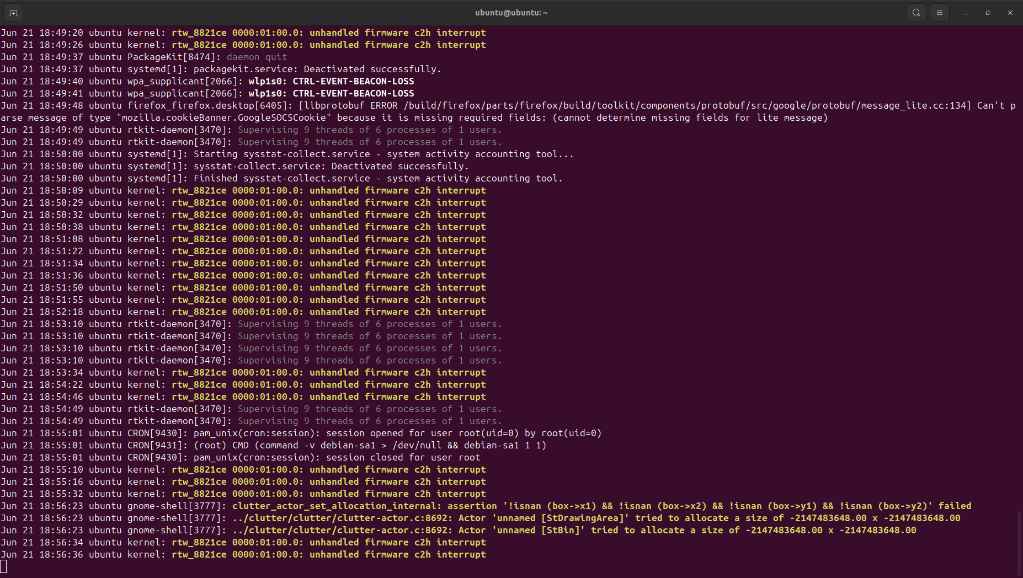
After a few minutes of running, my journalctl -f window looked like this.
 The message
 unhandled firmware c2h interrupt kept repeating over and over again. All these messages were associated with rtw_8821ce 0000:01:00.0, which refers to Realtek RTL8821CE Wi-Fi and Bluetooth adapter. Surprise, right? But, let's dig deeper. More often than not, c2h stands for "chip to host", meaning communication from the Wi-Fi chip to the main CPU was not taking place properly. These intermittent surges of messages also caused the Wi-Fi to disconnect shortly after. Although these messages don't directly say "crash", like the BSOD, they certainly tell us that enough of these will overwhelm the CPU, which will set off computational malfunctions, which will potentially cause a watchdog timeout signal. While not proven yet, the evidence is strongly indicative of it.
I rebooted Ubuntu, but this time I disconnected the Wi-Fi and ran the stress test:
dmesg -w
journalctl -f
sensors-detect followed by watch -n 1 sensors
stress-ng --cpu 0 --timeout 60m.
To my lack of surprise, no window showed any signs of mild or critical error messages after 60 minutes of running. Highest temperature of CPU reached during the test was 79°C. All behaviour under these circumstances was completely normal, since the stress test was engaging all 8 cores of my i7-1195G7.
Next, was repeating the same tests with the Wi-Fi enabled. Sure enough, one or two minutes in, a flood of unhandled firmware c2h again. There was no need to continue the test, since the evidence strongly points at something being wrong with the Wi-Fi adapter or its driver. Running a different OS helped me isolate the problem immensely.
Testing continues...
After this huge revalation, I rebooted back into Windows to perform a specific driver update. I headed on to the HP's official support website and found the matching Realtek Wi-Fi driver based off of my laptop model and OS version. In Device Manager, I found the Realtek RTL8821CE 802.11ac PCIe Adapter and uninstalled it, while also checking the box "Delete the driver software for this device". Must not leave any trace of the old driver. At first, Windows was insisting on installing its default driver dated 2011 when I uninstalled and rebooted, but the installation of the new driver was successful after a few tries. I also got the latest firmware driver and updated it, but first I deleted the old one in the same manner. This step is crucial since Windows Update does not delete old files when installing new ones, but it just writes over them.
What now? Is it solved?
More stress tests, but this time on Windows. First, with the Wi-Fi off. I disabled the driver from Device Manager and ran Prime95, which was my stress test intermediary. Alongside it for monitoring I chose HWiNFO64.
Phase 1: Wi-Fi DISABLED | Not just off from the taskbar, driver disabled through Device Manager
On Prime95, I selected "Small FFTs". This is a CPU-intensive test that primarily stresses the cores and caches, not much RAM.
Conclusion: peak temperature 97°C in around 2 hours of running, no unresponsiveness issues.
Phase 2: Wi-Fi ENABLED
I selected "Small FFTs" again.
Conclusion: peak temperature 97°C in over 10 hours of running, no unresponsiveness issues. It seems promising, but testing shall not stop there!
At this point, the laptop's uptime is sitting at ~15 hours, uninterrupted.
I decided to launch Chrome and browse YouTube again. Ten minutes later:
Frustrating as it is, it's also new information. This goes to show that there is a really high chance of this issue being caused by Chrome or network traffic. I reboot and run eventvwr.msc to look for critical events right before the crash. Surprisngly, none whatsoever.
At this point, I launch Chrome again and see how soon it will happen. After 10 minutes of running on one tab, nothing happened. I opened another tab to test progressively and 48 seconds in -- BSOD.
Ladies and gentlemen, it's a fair assumption to make that this is our smoking gun. Extremely strong evidence towards the Realtek Wi-Fi adapter not being able to handle heavy requests.
My last and final set of tests, were to perform the same in Firefox. Here is a breakdown of those.
| Length | Test | Signs |
|---|---|---|
| 10m24s | 1 YouTube Tab | No signs |
| 09m00s | 2 YouTube Tabs | No signs |
| 05m57s | 3 YouTube Tabs | No signs |
| 01m22s | 4 YouTube Tabs | No signs |
| 04m48s | 4 YouTube Tabs + Prime95 on full mode | Major glitches of video signal, minor glitches of audio signal, followed by 25s of Screen turned off with only the pointer visible |
| 00m37s | Prime95 on full mode | Responsiveness returned for the circumstances. |
Test concluded with no BSODs, but showed heavy signs of glitching since all its parts were basically on full throttle.
Luckily, I haven't had this problem again since. It has been an extreme wild goose chase figuring out this problem, but we finally tackled it.
References
- Zlatanov, N. (2014). Architecture and Operation of a Watchdog Timer. Publisher. Available from: Research Gate